Engineering · Design Systems · Part III
Full validation loop in contract based agentic design system
Part II made the contract typed and readable. It still could not tell me when an implementation stopped matching it. So the contract became something I can run, against three surfaces at once, from the design tool and from the command line.
Contents
Everything below is that recording written out, in the same order. The contract, the checks and the failure output are text here instead of video frames, which makes them readable at your own pace and searchable later.
Part II ended with a governed artifact: a typed definition.yaml, a generated spec.md, a portable mapping.json, readiness gates and an append-only evidence log. All of it was correct and none of it was enforceable.
A contract that a person or an agent has to read is still a document. It tells you what a Button is supposed to be. It cannot tell you that someone deleted a slot from the Phoenix component last Tuesday, or that a Figma variant lost its icon layer during a rename, or that the React prototype quietly stopped rendering the two parts in the contracted order. Every one of those is a small edit that no test covers, because the tests belong to the implementations and the contract belongs to nobody.
So the work since Part II went into one thing. The contract now has adopters, and there is a command that compares each adopter against it.
The contract describes a capability and says nothing about rendering
The authored contract for Button is a single YAML file under design_system/adopted/artifacts/action.button/. It carries the schema version, the semantic ID, purpose and boundary, usage rules, requirements, non-goals, accessibility, responsive behavior, stress cases, decisions and anatomy. Two slot definitions are enough to show how the checking works.
slots:
  - id: slot-label
    role: Supplies the visible label and accessible name.
    required: true
    cardinality: { min: 1, max: 1 }
    accepts:
      content_types:
        - text
        - markup

  - id: slot-leading-icon
    role: >-
      Every conforming implementation exposes this capability. A button
      instance may supply one decorative leading Iconify glyph. An empty
      slot renders no icon part and no residual layout space.
    required: false
    cardinality: { min: 0, max: 1 }
    accepts:
      content_types:
        - icon
      artifact_kinds:
        - component
action.button/button.definition.authored.yaml, the slots section
The role field for slot-leading-icon does not say the icon must be visible. It says every conforming implementation has to expose the capability, and that an empty slot leaves no residual layout space. A React component with no leadingIcon prop fails that. A Phoenix component with no :leading_icon slot fails it. A Figma component set with no attached icon layer fails it. Three different technologies, one sentence they all have to satisfy.
Two adopters are required and one is experimental
Part II had Figma and Phoenix. This cohort adds React, and the third implementation made the roles explicit. Each adopter declares what it is for and how strictly it is checked.
- figma (design, required) is the design surface. Fourteen checks run against it, from
contract-sourceandnodeidentity throughvariant-matrix,nested-anatomy,token-bindingsanddimensional-literals. - phoenix (runtime, required) is the component that actually ships to production,
EnaiaWeb.Components.Core.button/1. - react (prototype, experimental) is a prototyping kit under
design_system/adopted/evaluation/harness/. It is checked, and it is allowed to be experimental.
In the React component the contract becomes visible in ordinary application code.
export function Button({
  hierarchy = "primary",
  size = "medium",
  leadingIcon,
  disabled = false,
  type = "button",
  className,
  children,
  ...rest
}) {
  requireContract(
    children != null && children !== "",
    "Button requires a label - it supplies the accessible name",
  )

  return (
    <button
      type={type}
      className={cx("ds-button", className)}
      data-hierarchy={hierarchy}
      data-size={size}
      data-design-system-artifact="action.button"
      disabled={disabled}
      {...rest}
    >
      {leadingIcon && (
        <Icon
          name={leadingIcon}
          className="ds-button__leading-icon"
          data-design-system-part="part-leading_icon"
        />
      )}
      <span
        className="ds-button__label"
        data-design-system-part="part-label"
      >
        {children}
      </span>
    </button>
  )
}
src/ds/Button.jsx, reduced
The data-design-system-artifact and data-design-system-part attributes are how a rendered DOM node reports which contract and which contracted part it claims to be. That is what makes anatomy checkable at all.
A few lines above that component, Part II’s evidence log appears where an agent will actually read it:
/*
 * RATIFIED ACCESSIBILITY EXCEPTION - do not "fix". White on
 * color.action.primary.default measures ~3.78:1, below AA for
 * normal text. The owner accepted that gap for reference parity
 * on 2026-04-16. The darker blue-500 candidate was rejected on
 * 2026-07-14. Changing the fill requires a new ratified
 * decision, not an agent-side correction.
 */
An agent reading this file will find a contrast ratio below AA and will want to correct it. The comment names the decision, both dates, the rejected alternative, and who is allowed to reopen it. Recording a decision in an evidence log is only half of it. The other half is putting the decision where the correction would otherwise happen.
The same check runs in Figma and on the command line
Two front ends, one comparison. In Figma there is a plugin called Agentic Design System with Contract, Review and Apply tabs. Select the Button component set, pick the contract, press Check. The header line reads 32 contracts · 30 mapped to Figma, and it names what this component ships as in production and the route of its Storybook story.
The plugin is a convenience. It puts the check where a designer already is.
The same comparison runs as a Mix task.
$ mix design_system.adopters.compare action.button
Compiling 25 files (.ex)
adopter_contract: action.button - conformant

● figma (design, required) - conformant
  ● contract-source
  ● page
  ● node
  ● key
  ● representation
  ● component-properties
  ● component-slots
  ● variant-matrix
  ● variant-identities
  ● root-layout
  ● component-property-attachments
  ● nested-anatomy
  ● token-bindings
  ● dimensional-literals
● react (prototype, experimental) - conformant
  ● adapter-capabilities
  ● contracted-property-values
  ● populated-slot-anatomy
  ● required-slot-enforcement
  ● optional-slot-collapse
  ● contract-requirements
● phoenix (runtime, required) - conformant
  ● adapter-capabilities
  ● contracted-property-values
  ● populated-slot-anatomy
  ● required-slot-enforcement
  ● optional-slot-collapse

Summary: 3 conformant · 0 drifted · 0 incomplete
all three adopters conformant, in about eleven seconds
An agent runs the Mix task while working, and CI runs it on every change.
Removing one optional slot breaks all three implementations
To show it failing I deleted the leading icon from all three places. The :leading_icon slot out of the Phoenix component. The leadingIcon block out of Button.jsx. The icon layer off the Figma variant.
In Figma the Review tab comes back with 10 checks passed, 3 problems, 1 unassessed, and writes a snapshot to design_system/adopted/governance/evidence/action.button/figma-snapshot.recorded.json. Each problem gets a Problem line and a Fix line.
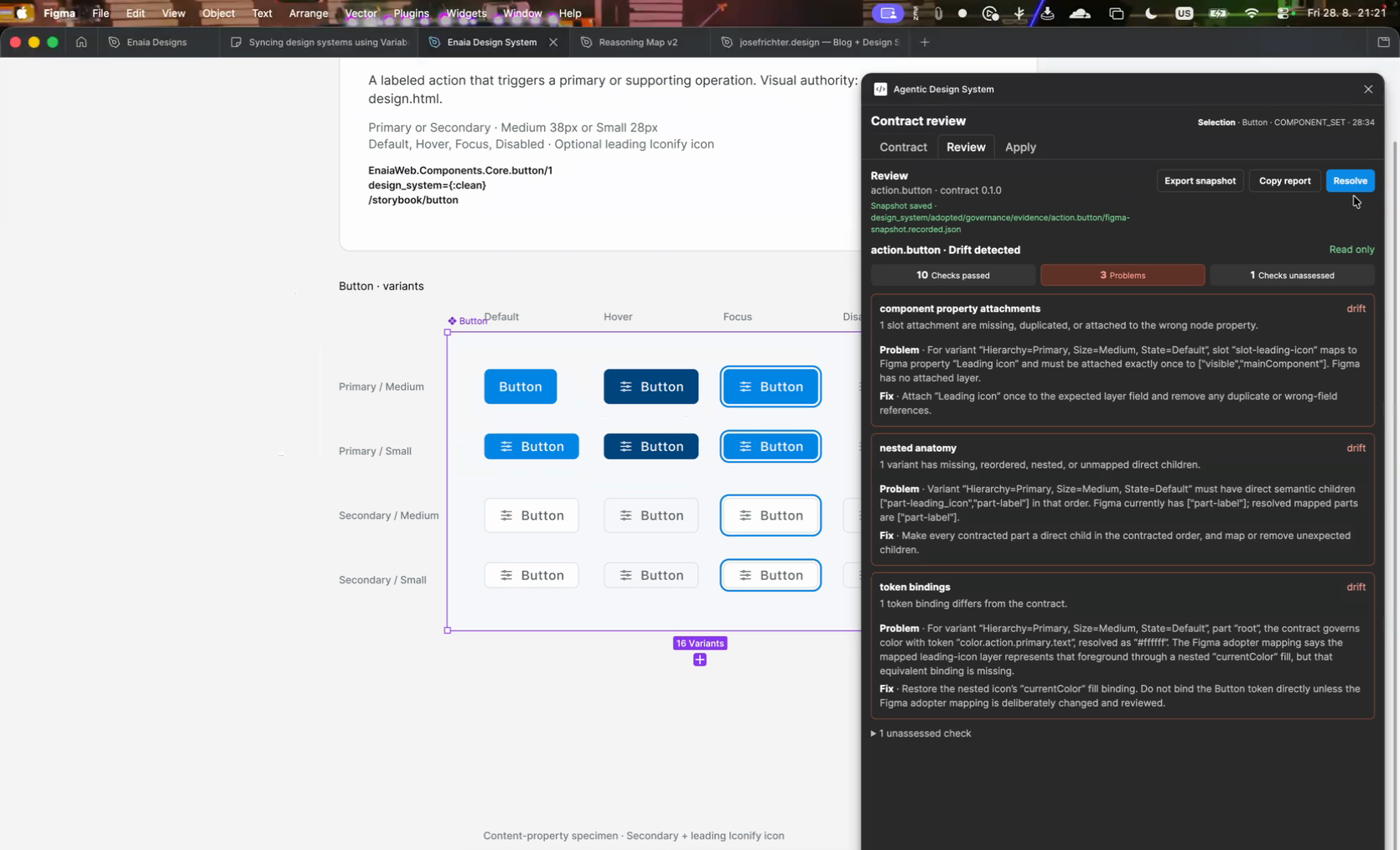
Three problems from one deleted layer. The contract governs the root color through color.action.primary.text, and the Figma mapping says the leading icon layer supplies that foreground through a nested currentColor fill. Delete the layer and the binding has nothing to resolve against.
The failure report is addressed to whoever has to fix it
The command-line run fails the same way.
● react (prototype, experimental) - drift-detected
  ● adapter-capabilities
  ● contracted-property-values
  ● populated-slot-anatomy - failed
    [incorrect-react-anatomy] The populated React Button does not
    preserve contracted slot anatomy.

    Expected:
      One decorative leading icon followed by one label.

    Actual:
      <button type="button" class="ds-button" data-hierarchy="primary"
        data-size="medium" data-design-system-artifact="action.button">
        <span class="ds-button__label"
          data-design-system-part="part-label">Continue</span>
      </button>

    Action:
      In src/ds/Button.jsx, render leadingIcon before children, mark
      the two parts, and keep the icon decorative.
Every failure carries a stable diagnostic code, an Expected, an Actual and an Action. The Action names the file and the edit. The Phoenix failure goes further and names both possible fixes:
Action:
  In lib/enaia_web/components/core.ex, declare and render slot
  :leading_icon in EnaiaWeb.Components.Core.button/1. If another
  slot implements slot-leading-icon, change path on binding
  contract_ref=slot:slot-leading-icon in
  design_system/adopted/artifacts/action.button/
  button.phoenix-mapping.authored.json.
The checker does not assume the implementation is wrong. A slot can be absent because someone deleted it, or because the component implements the capability under a different name and the mapping is stale. One of those is fixed in the component and the other is fixed in the mapping file, and the report says so.
The run ends with Summary: 0 conformant · 3 drifted · 0 incomplete and a non-zero exit through ** (Mix) adopter_contract: drift detected; follow the actions above.
The checks below a failed one come back blocked
When the Phoenix adapter fails adapter-capabilities, the four checks below it do not fail. They come back blocked.
● phoenix (runtime, required) - drift-detected
  ● adapter-capabilities - failed
    [missing-phoenix-slot] A mapped contract slot is absent from
    the Phoenix component API.

    Expected:
      EnaiaWeb.Components.Core.button/1 declares slot "leading_icon"
      for contract slot slot-leading-icon.

    Actual:
      Phoenix component metadata does not contain that slot.

  ● contracted-property-values - blocked
  ● populated-slot-anatomy - blocked
  ● required-slot-enforcement - blocked
  ● optional-slot-collapse - blocked
The component API has no :leading_icon slot, so the checker cannot evaluate whether an absent slot collapses without residual layout space. Reporting four more failures would be five problems where there is one. An agent handed five failures will try to fix five things. The summary counts drifted adopters and incomplete adopters separately for the same reason.
Putting it back
Restoring the three implementations is the other half of the demo. Add slot :leading_icon back to the Phoenix component:
slot :inner_block
slot :leading_icon

def button(assigns) do
  ~H"""
  <button
    class={[@base_classes, @button_classes, @size_classes, @class]}
    disabled={@disabled}
    type={@type}
  >
    <.clean_button_leading_icon
      :if={@design_system == :clean}
      leading_icon={@leading_icon}
    />{render_slot(@inner_block)}
  </button>
  """
end
lib/enaia_web/components/core.ex, reduced
Then put the leadingIcon block back in Button.jsx, and restore the layer in Figma.
The plugin reports zero problems immediately, because it reads the live Figma document. The Mix task takes about eleven seconds, most of which is recompiling 25 Elixir files, and comes back with three conformant adopters.
Conformance is now a build step
Part I built a pipeline that compiles tokens into platform values. Part II made component meaning typed, owned and recorded. This stage makes the contract executable against every surface that claims to implement it.
The practical result is that the three implementations stay in sync at all times. An agent runs the check during the work rather than at the end of it, and gets back the file to open and the edit to make. CI runs the same command and blocks the change when an adopter drifts. A designer checks the same contract from inside Figma without leaving the file.
Thirty of the thirty-two contracts are mapped to Figma today. The next stage is the rest of them, and then an open question. The checker already knows the expected anatomy, the mapped node and the named repair. How much of the fix it should be allowed to make on its own is what the Apply tab in that plugin is for.
Sources / further reading
- Building an Agentic Design System: Tokens, MCP, and Code Connect, Part I.
- From Pipeline to Governed Artifacts, Part II, which introduced the typed contract and the artifact directory this post checks against.
- W3C Design Tokens Community Group, the token format underneath the value pipeline.
- Figma Plugin API, used by the contract review plugin shown above.
- Enaia, the commercial-real-estate product used as the production case study.